
Daily Visual Schedule: Free Printable Template for Autism, Kids and Preschool Routines
Download a free daily visual schedule with a printable routine board, activity tiles, and simple setup tips. Use it for autism supports, preschool routines, morning routines, bedtime, transitions, and calmer family days.
Visual schedules are one type of visual support. If the moment only needs two steps, a first-then board may be easier. For a sturdier printable setup, follow the print, laminate, and prep guide.
Free visual schedule template PDF
The free starter set is the best place to begin if you want a simple printable visual schedule template without building a full custom system from scratch.
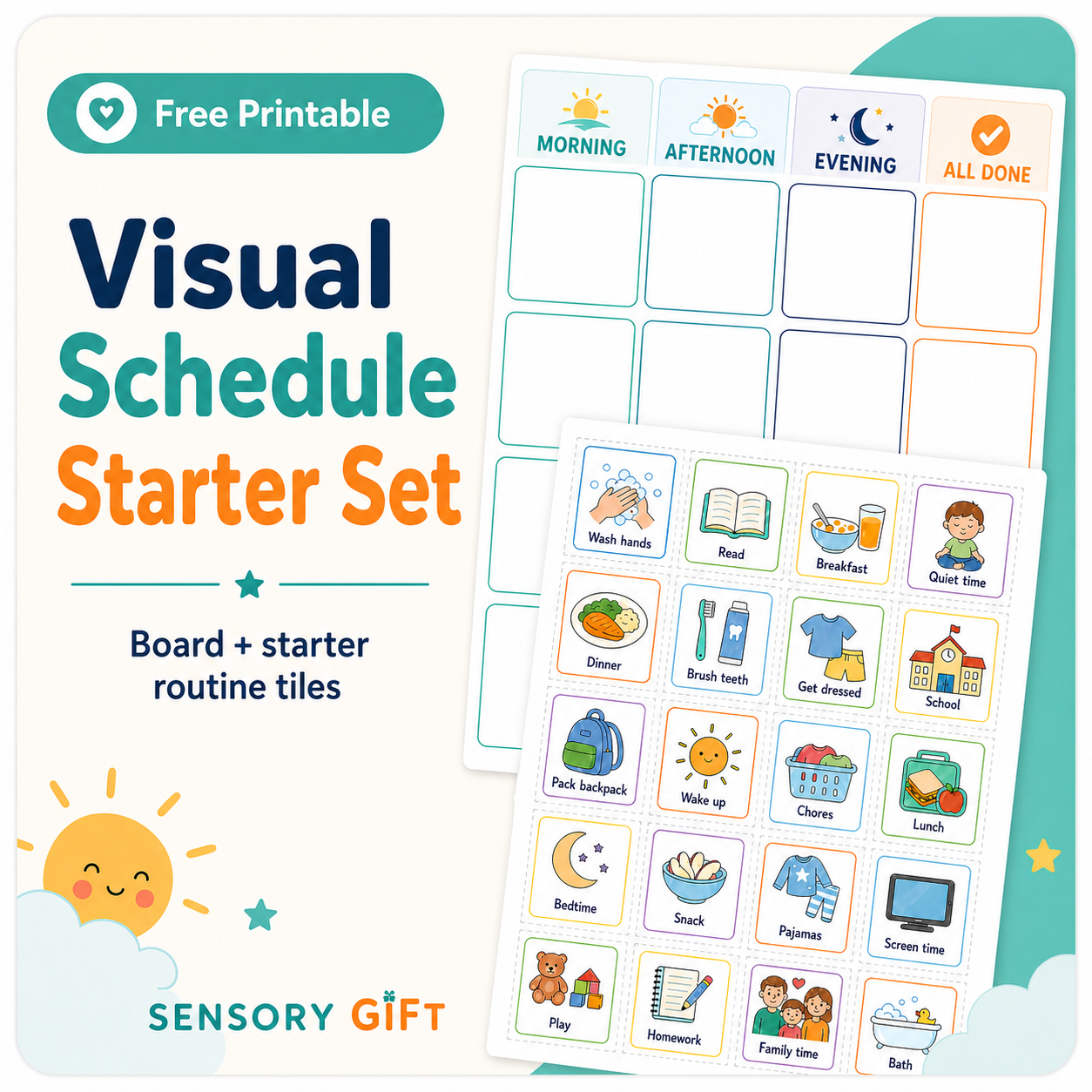
Start with a simple board and a small set of useful tiles.
The starter set is meant to be easy to print, easy to cut, and not overwhelming for a beginner. Use it for one routine first, then add more structure once the schedule feels familiar.
- Daily visual schedule board for morning, afternoon, and evening.
- Starter activity tiles for common daily routines.
- Simple setup guidance for home, school, preschool, or therapy carryover.
- A low-tech option for families who want a printable tool instead of another screen.
What is a visual schedule?
A visual schedule is a picture-based plan that shows what is happening now, what comes next, and what is finished. It can be a printable routine board, a classroom schedule, a preschool visual schedule, or a digital visual schedule on a phone or tablet.
Visual schedules help because they turn spoken directions into something visible and concrete. Instead of repeating every step, you can point to the schedule, preview the routine, and show changes in a calmer way.
The goal is to make the day easier to understand. A good visual schedule gives structure while still allowing real life to change.
Visual schedule examples by routine
Visual schedules work best when they are tied to one real routine. Start with the part of the day that feels most rushed, repetitive, or stressful.
Morning routine
Use a morning routine visual schedule for bathroom, getting dressed, breakfast, brushing teeth, shoes, backpack, and leaving the house.
Preschool day
Use a preschool visual schedule for arrival, snack, play, cleanup, bathroom, outside time, rest, and going home.
Bedtime routine
Use a bedtime visual schedule for pajamas, brushing teeth, story, calm body, and bed. Keep the order familiar most nights.
Classroom visual schedule
Use a classroom schedule to show arrival, work time, group activity, lunch, outside time, cleanup, and dismissal. A finished area helps students see progress.
After-school visual schedule
Show the transition from school to home with simple steps like snack, break, homework, outside time, dinner, and evening routine.
Transition visual schedule
For hard transitions, use only two or three tiles: what is ending, what comes next, and what happens after that.
Hygiene visual schedule
Use a short picture sequence for bathroom, hand washing, brushing teeth, hair brushing, shower steps, or getting ready.
Who can use a visual schedule?
A visual schedule can help many children, teens, and adults who benefit from seeing the plan instead of only hearing it. It can be especially useful when routines, transitions, waiting, or changes in plans are hard.
Autism visual schedules
Autistic children and adults may use visual schedules to reduce uncertainty, support communication, and make transitions easier to understand.
ADHD and executive function
Visual routines may help with task initiation, sequencing, remembering steps, and returning to the plan after distractions.
Anxiety and change
A schedule can preview what is coming, show when a preferred activity will return, and make unexpected changes more concrete.
Preschool and early learners
Young children often need simple, repeatable visuals for daily routines like cleanup, snack, bathroom, outside time, and rest.
Visual schedule for autism
A visual schedule for autism can reduce uncertainty, support transitions, and make routines feel more predictable. Many autistic children, teens, and adults process visual information more easily than long verbal instructions, especially during busy or stressful parts of the day.
Transitions
Use the schedule to show what is ending, what comes next, and when a preferred activity will return.
Independence
Move finished tiles to an all-done area so progress is visible without constant adult prompting.
Communication
When words are hard, the schedule gives everyone a shared visual reference for the plan.
If a full-day schedule feels like too much, start with a first-then board or a three-step routine. Add more tiles after the visual system feels predictable.
Visual schedule for kids and preschool routines
A visual schedule for kids should be simple enough to use every day. For preschool, toddlers, and early elementary routines, keep the board short, use clear picture tiles, and repeat the same routine language.
| Preschool visual schedule | Use simple picture tiles for arrival, snack, play, cleanup, bathroom, outside time, rest, and going home. Keep the schedule short and review it often. |
|---|---|
| Visual schedule for kids | Use moveable tiles for morning routines, school prep, homework, chores, hygiene, meals, and bedtime. Add a finished area for independence. |
| Visual schedule for teens | Use more discreet visuals, text labels, checklists, timers, and app-based routines for schoolwork, self-care, appointments, and transitions. |
| Visual schedule for adults | Use neutral designs for work routines, home care, medication reminders, appointments, meal prep, rest breaks, and executive function support. |
How to use a visual schedule
Start with one routine
Choose a routine that causes stress, such as morning, bedtime, leaving the house, homework, or transitions after school.
Use fewer tiles at first
Start with 3 to 5 tiles. Too many steps can overwhelm a beginner. Add more once the schedule feels familiar.
Preview the plan
Point to the tiles and use simple language: “First breakfast, then brush teeth, then shoes.” Keep your wording consistent.
Move finished tiles
Let the user move each completed activity to a finished area. This makes progress visible and gives the routine a clear end.
Show changes visually
If the plan changes, swap the tile while the person watches. Say the change briefly, then point back to the schedule.
How to print, laminate, and prep the visual schedule
Once you know the visual schedule is useful, you can make it sturdier with cardstock, laminating pouches, Velcro dots, and a simple storage system.
The setup guide walks through printing, laminating, cutting tiles, adding Velcro dots, setting up the board, storing extra tiles, and avoiding common prep mistakes.
First-then board or visual schedule?
A visual schedule shows a larger routine or sequence. A first-then board is a smaller visual support with only two steps: what happens first and what happens after. It is useful when a full schedule is too much, when one transition is difficult, or when someone needs a quick reminder of the next step.
Use a first-then board when…
- The moment only needs two steps.
- The user is overwhelmed by too many tiles.
- You need to show one expectation followed by one clear next activity.
Use a full visual schedule when…
- The user is ready to see more of the day.
- You want to build independence across a routine.
- You need a morning, school, bedtime, or full-day plan.
Printable visual schedule or free app?
Use the printable when you want a hands-on routine board with moveable tiles. Use the free SensoryGift app when you want to quickly create, edit, print, or share custom routines and first-then boards.
Need a custom visual schedule builder instead of a printable? The app is the better fit for that search intent.
- Create a custom visual schedule online when a printable set is not flexible enough.
- Create first-then boards for quick transitions.
- Print or share a schedule when routines change.
- Use Spanish or Chinese in the app interface.
Common visual schedule mistakes
Starting with too many tiles
Use fewer tiles. A first-then board or a 3-step routine is often better than a full-day schedule for beginners.
Using it only during meltdowns
Introduce the schedule during calm moments first. It should become a familiar support before stressful transitions happen.
Changing the plan without showing the change
Add a change tile or calmly swap the visual tile while the person watches. Keep your language short and point back to the schedule.
Forgetting the finished area
A finished pocket, finished strip, or all-done area helps the user see progress and understand when a step is complete.
Using visuals that feel too young
Use discreet themes, neutral icons, or text-minimal cards for older kids, teens, and adults.
FAQ: Visual schedules
What is a visual schedule?
A visual schedule is a picture-based routine that shows what is happening now, what comes next, and what is finished.
Is this a free visual schedule template?
Yes. The free starter set includes a printable visual schedule board, starter activity tiles, and setup guidance.
Is this visual schedule for autism?
Yes. It was designed with autistic children and sensory needs in mind, but it can also help with ADHD, anxiety, executive functioning challenges, preschool routines, and general family routines.
Can I use this as a preschool visual schedule?
Yes. For preschool, keep the schedule short and use simple tiles for arrival, snack, play, cleanup, bathroom, outside time, rest, and going home.
What are good visual schedule examples?
Common examples include a morning routine visual schedule, bedtime visual schedule, preschool visual schedule, classroom visual schedule, after-school schedule, and first-then transition board.
What is the difference between a visual schedule and a first-then board?
A visual schedule can show several steps or a full routine. A first-then board shows only two steps, making it better for quick transitions or difficult moments when a full schedule is too much.
Where can I learn about other visual supports?
You can use the SensoryGift Visual Supports hub to compare visual schedules, first-then boards, choice boards, visual timers, transition supports, and printable visual tools.
How do I make a printable visual schedule last longer?
Print on cardstock if you can, laminate the board and tiles, cut the tiles carefully, and use Velcro dots, magnetic tape, or tape so the schedule can be changed. The full setup guide shows the prep process step by step.
Do I need to laminate a visual schedule?
No. You can start with regular paper and tape. Laminating is helpful if the schedule will be used every day, moved between home and school, or handled by young children.
What is in the premium visual schedule set?
The premium visual schedule printable set is the expanded option for families who want a larger, more flexible printable system with more tiles and routine-building options.
Can I make a custom visual schedule online?
Yes. The free SensoryGift visual schedule app lets you create custom visual schedules and first-then boards that you can print, save, or share.
Can teens or adults use a visual schedule?
Yes. Teens and adults can benefit from visual routines, especially when the schedule uses discreet, age-appropriate visuals.
Does the app support Spanish or Chinese?
Yes. The visual schedule app interface supports Spanish and Chinese. The printable PDF is English.
Should I use the printable or the app?
Use the printable for a physical routine board with moveable tiles. Use the app when you want to create, edit, print, or share custom schedules quickly. Many families use both.
How many tiles should I start with?
Start with 3 to 5 tiles and build up slowly once the user understands the routine.