

Make the next step smaller when the moment feels too big.
Reset is a free, low-demand app for moments when you cannot get started, everything feels like too much, words are hard, you are frozen, you cannot decide, or you are not sure what would help.
You do not have to explain the whole problem first. Start with what feels closest and get one smaller thing to try.

Start where you are
You do not have to know what kind of help you need.
Choose the feeling that is closest. Reset can help when you are stuck, overloaded, frozen, out of words, unable to decide, or trying to recover and come back.
You can also choose “I don’t know what I need.” You do not have to figure it out before opening the app.
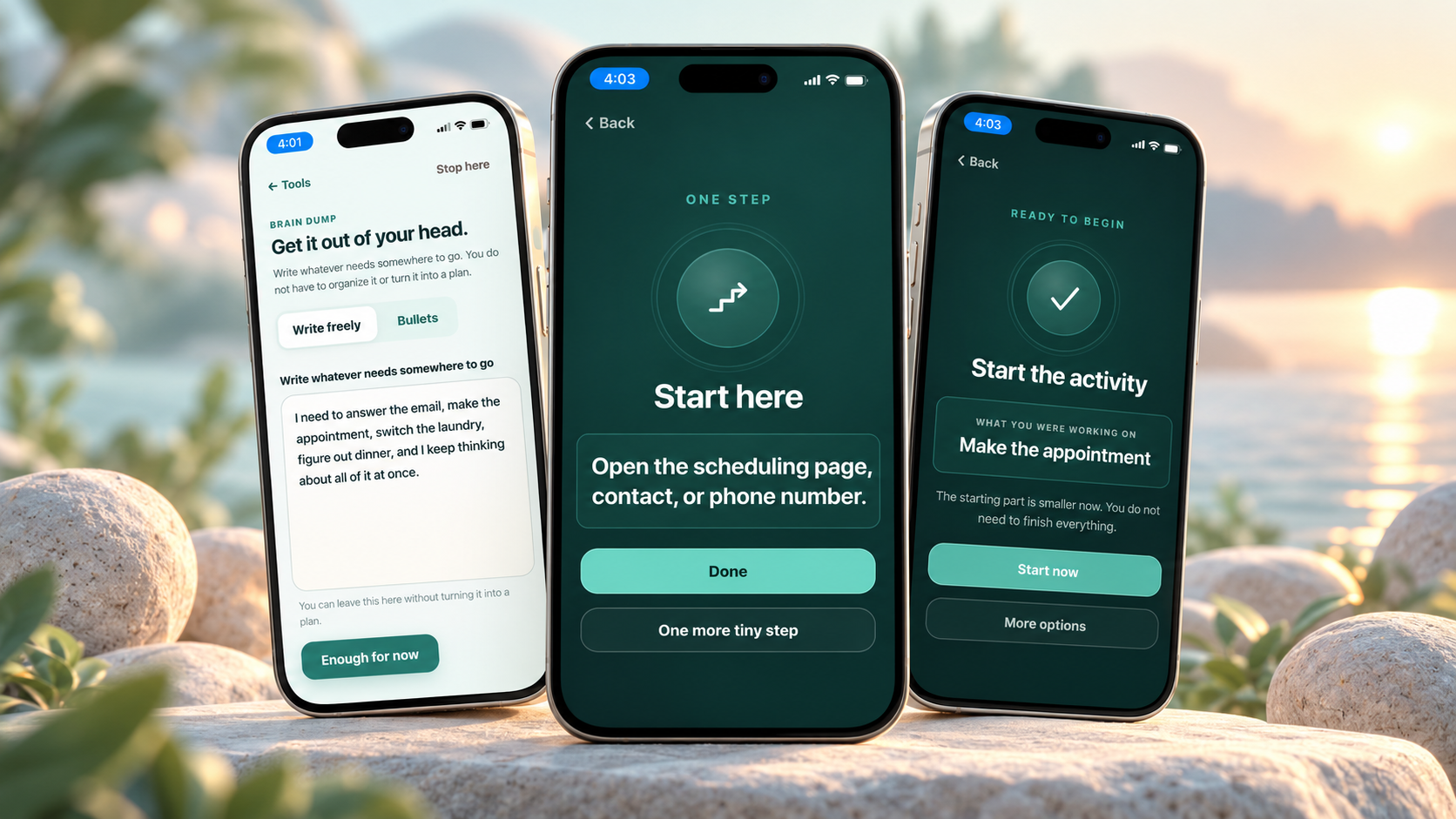
What Reset helps with
Different hard moments need different kinds of help.
Reset does not assume every stuck moment needs more motivation. Sometimes the useful next step is smaller action. Sometimes it is fewer choices, less input, a place to put a thought, a way to stop, or simply company while you begin.
Can’t get started?
Turn a task into one first action, make the next part smaller, or use quiet on-screen company while you begin.
You may use: Tiny Steps, Stay With Me, task-start supports.
Everything feels like too much?
Lower choices and input, check body or sensory needs, decompress, or give yourself permission to stop.
You may use: Body Check, Decompress, Stop Here, Companions.
Frozen or out of words?
Use less language, borrow a short script, stay quiet, recover first, and come back only when you are ready.
You may use: low-words support, Scripts, Recovery, Re-entry.
Can’t make a decision?
Reduce the choices, make the decision smaller, let something wait, or park it safely instead of forcing an answer.
You may use: Decision Relief and decision parking.
Too much is in your head?
Get thoughts out of working memory, hold something for later, and move only one thing forward if you want to.
You may use: Brain Dump, Hold This Thought, My Reset.
Need to stop, switch, or come back?
Leave a marker, make the transition smaller, pause without losing your place, or return gently after something hard.
You may use: Help Me Switch, Stop Here, Recovery, Re-entry.
Not another planner
Reset is for the moment when knowing the plan is not enough.
You may already know what needs to happen. The hard part may be starting it, switching to it, deciding what matters, or doing anything while your capacity is low.
Doing less can be useful. Stopping can be useful. Asking for help can be useful. Reset is not a test of how much you can get done.
When another instruction is too much
Watch, listen, draw, or fidget instead.
Reset Companions are optional low-demand experiences for moments when a quiet visual, sound, drawing surface, or simple interaction fits better than another step to complete.
Core hard-moment help stays free. Apps Pro adds direct access to the full Companion collection from Tools.
Keep less in your head
Let Reset hold what you do not need to carry right now.
You can keep useful supports, hold a thought for later, park a decision, or leave yourself a way back to something unfinished.
Your Reset information is stored locally on the device, and existing held items are protected from silent overwrite when space is full.
Free first
The help you need in a hard moment is not locked behind Pro.
Reset’s core hard-moment path stays free. Apps Pro is optional for people who want more saved/custom room and direct access to the full Companion collection.
Use the core app without an account
- Start from the hard moment you are in
- Use core Reset paths and built-in supports
- Use Companion handoffs offered during Reset help
- Save and customize within the current Free capacity
- Use backup/import, offline-ready core screens, and comfort controls
More room + direct access
- More saved and custom capacity in Reset
- More custom Tiny Steps and custom Scripts
- Direct access to the full Companion collection from Tools
- One Apps Pro purchase across ViziCues, SensyCues, and Reset
Made to stay out of your way
Local-first, low-demand, and adjustable.
Core free use does not require an account. Reset stores app information on your device and includes controls that can make the interface quieter and easier to use.
Your Reset content stays local
- Saved supports, custom content, settings, and held items stay in local browser/app storage.
- You can download a backup and import it later.
- Cached core screens can work offline after a successful load.
- Apps Pro purchase access is separate from your local Reset backup.
Back up before clearing browser/site data or deleting the installed app. Clearing local storage can remove saved Reset information.
Who Reset is for
Use it because the moment is hard—not because you have the right diagnosis.
Reset is written around needs and states. It can be used independently or alongside another person.
Adults and older teens
For hard-to-start tasks, decision overload, shutdown, low-words moments, sensory overload, transitions, recovery, and other low-capacity moments.
Caregivers, partners, and family
Offer less language, a smaller choice, body-first support, a stopping point, or a gentler way back without demanding a full explanation.
Educators and support teams
Use practical task-start, communication, transition, recovery, and low-demand supports when they fit the person and setting.
Three apps. Three clear jobs.
Use the app that matches what is hard right now.

ViziCues
Build visual schedules and routines, then narrow them to the current and next step when sequence and predictability are the missing support.
Learn about ViziCues When sensory support needs planning
SensyCues
Choose sensory supports, plan them around real moments, record response, and notice cautious patterns over time.
Learn about SensyCues
Reset
Lower the demand and find one smaller support when you are stuck, overloaded, frozen, unable to decide, unable to start, or unsure what would help.
Open ResetSafety
Everyday support, not crisis or medical care.
Reset is an educational support tool for everyday stuck, overloaded, shut-down, low-words, transition, decision, recovery, and hard-to-start moments.
- Reset does not diagnose or treat a medical or mental-health condition.
- It does not replace therapy, medical care, emergency services, crisis support, or an individualized safety plan.
- For immediate danger or another urgent safety concern, use appropriate emergency/crisis services or qualified support.
- Stop any suggested action that feels unsafe, painful, distressing, or wrong for the person or situation.
Start where you are
You do not have to fix the whole day.
Open Reset, choose what feels closest, and try one smaller support. Stop there if that is enough.
Frequently asked questions
About Reset by SensoryGift
What is Reset by SensoryGift?
Reset is a low-demand app for everyday moments when starting, deciding, switching, talking, stopping, recovering, or figuring out what would help feels too hard. It starts with what feels closest and offers one smaller support.
Can Reset help with task paralysis?
Reset can support the immediate stuck moment by lowering choices and helping you find one smaller action. Depending on what you choose, that may include Tiny Steps, quiet on-screen company, a body check, a stopping point, or another lower-demand support.
What can I do when I feel overwhelmed or overstimulated?
Reset can reduce choices, check body and sensory needs, support decompression, offer a stopping point, or move into a quiet Companion when that fits better than another instruction.
Can Reset help when I am shut down or words are hard?
Yes. Reset includes paths that reduce language and choice demand, offer short scripts or quiet support, and separate recovery from pressure to become productive immediately. Reset is support, not treatment for shutdown.
Is Stay With Me the same as live body doubling?
No. Stay With Me offers quiet on-screen company while you begin or continue. It is not a live person, video call, accountability service, or replacement for human body doubling.
What is the difference between Reset and a planner?
A planner helps capture and organize what needs to happen. Reset is for the point where the plan or task already exists but starting, deciding, switching, continuing, or stopping is hard.
Is Reset free?
Yes. The core hard-moment path stays free. SensoryGift Apps Pro is optional and adds more saved/custom capacity and direct access to the full Companion collection from Tools, along with current suite-wide Pro benefits.
Does Reset require an account?
No account is required for core free use. Reset is local-first, so saved supports, custom content, settings, and other local Reset information stay in browser or installed-app storage on the device.
Does Reset work offline?
After Reset and its core files load successfully, cached core screens can work without a connection on supported devices. Website links, updates, and Apps Pro purchase or restore checks still require internet access.
Where is my saved information stored?
Reset stores local app information on the device in browser or installed-app storage. You can use backup/import tools when you want a copy to restore later. Clearing browser/site data or deleting the installed app can remove local content, so back up first when you want to keep it.
What is the difference between Reset, ViziCues, and SensyCues?
ViziCues makes routines and next steps visible. SensyCues helps choose, plan, use, and review sensory supports over time. Reset is for an immediate hard moment when the current demand is already too much.
Is Reset therapy, medical advice, or crisis help?
No. Reset is everyday educational support. It does not diagnose, treat, replace therapy or medical care, provide emergency or crisis care, or create a personal safety plan.
Learn more by need