
Visual Schedules: A Practical Guide for Autism, Kids, Teens, and Adults
A visual schedule makes a routine easier to see. It can show a whole day, a short sequence, a school or work block, an appointment, or simply what happens next. The format can use objects, photos, icons, words, or a mix that fits the person using it.
The goal is clarity and predictability, not compliance. A useful schedule gives someone a visible place to check the plan instead of relying only on memory, repeated verbal prompts, or guesswork.
What is a visual schedule?
A visual schedule is an ordered set of activities or steps that someone can look at to understand what is happening now, what comes next, what changed, or when a routine is finished.
It can be as small as two steps or as broad as a full day. The useful amount of information is the amount that makes the routine clearer—not automatically the largest schedule you can make.
What does a visual schedule actually do?
It moves sequence out of someone’s head and into a form they can check again. That can reduce the need to remember several steps at once or repeatedly ask what is happening next.
Make the order visible
Keep the sequence available so the person can return to it whenever the plan becomes unclear.
Make progress visible
Completed items can be checked, moved, removed, faded, or simply recognized as finished.
Make changes visible
When real life changes, update the schedule so the visual still describes the plan that is actually happening.
Visual schedules for autism: make the plan easier to see
Visual schedules are commonly used in autism support because they can make sequence, transitions, and changes easier to refer back to without depending only on spoken language. They are one support option, not a requirement for every autistic person.
The useful question is not “What should an autism visual schedule look like?” It is “What information does this person need to see, and what form makes that information easiest to understand?”
If you are adapting a schedule specifically for an autistic child, teen, or adult, the autism visual schedule guide goes deeper into representation, sensory load, transitions, schedule changes, age-respectful formats, and keeping the support focused on clarity rather than compliance.
Transitions
Show what is ending and what follows before the switch happens.
Predictability
Keep the sequence available so the plan does not need to be repeated verbally every time.
Changes
Move, replace, or mark changed activities clearly instead of leaving an outdated plan visible.
If a full schedule feels like clutter or pressure, show less. For one difficult transition, a First-Then board may be a better fit than a whole routine.
Visual schedules can grow with the person using them
Young children and early learners
Concrete visuals, short routines, and movable cues can be useful when touching or moving the next step supports understanding. For a preschool-specific school day, see the preschool visual schedule guide and free Preschool Day routine.
Teens
Neutral icons, text-forward schedules, darker presentation, timers, and discreet phone-based supports may fit better than childlike picture cards.
Adults
Visual schedules can support work sequences, self-care, appointments, meal preparation, household tasks, study blocks, and other recurring routines.
Visual routines may also be useful for ADHD and executive-function challenges when the hard part is starting, sequencing, remembering steps, or returning to a task after distraction. They are practical external supports, not treatment.
Start with one routine that actually happens
You do not need to organize an entire life before a visual schedule can help. Start with one recurring routine, transition, or block of time where seeing the order would make things easier.
Morning visual schedule
Useful when the same steps happen most mornings but the sequence gets lost in the rush.
See the morning visual schedule guide + free Morning Routine →
Bedtime visual schedule
Keep the familiar structure visible while still changing it when the evening is different.
Classroom or school schedule
A school schedule can show broad periods, a center rotation, arrival, packing up, or another repeatable sequence.
See the classroom visual schedule guide + free Classroom Day routine →
Homework, study, or work block
Helpful when starting, staying oriented inside the block, or recognizing “done” is the difficult part.
Leaving-the-house routine
Keep the small sequence available when the transition out the door tends to scatter attention.
Appointment or unfamiliar event
Use broad steps when every detail is not known. The schedule can show what is predictable without pretending everything is certain.
Build the smallest schedule that answers the question
1. Choose one routine or sequence
Morning, bedtime, hygiene, leaving, homework, school, work, or another repeatable sequence is easier to test than a full-day overhaul.
2. Break it into clear steps
Use labels such as “shoes,” “pack bag,” or “brush teeth” instead of broad directions like “get ready.”
3. Choose a representation that makes sense
Use objects, photos, icons, drawings, words, or a mix. More detailed pictures are not automatically clearer.
4. Make “what is next?” easy to check
Point, tap, move a tile, mark a checkbox, or use another simple interaction that turns the schedule into a reliable reference.
5. Make finishing visible
Use a completion signal that fits the person: move, check, fade, remove, or advance.
6. Update it when the plan changes
If real life changes, change the visual too. A schedule becomes less useful when it repeatedly shows something that is no longer true.
Should a visual schedule use objects, photos, icons, or words?
Objects
Useful when an actual item or object cue carries more meaning than a flat image.
Photos
Useful when a specific place, person, object, or familiar real-world cue matters.
Icons or illustrations
Useful when a simple reusable symbol is easy to scan across different routines and settings.
Words or checklists
Useful for readers who prefer a less picture-forward or more discreet support.
Mixed formats
Use a photo where specificity matters, an icon where simplicity helps, and words where words are enough.
Real-life fit
The “best” visual is the one the person recognizes and wants to use—not the most decorative option.
Show enough information to help — not automatically the whole day
Two steps
When the main question is “what happens after this?”, use a First-Then board.
A short routine
Use a handful of steps for hygiene, packing up, homework, bedtime, leaving, or another contained routine.
A fuller sequence
Use broad blocks for a school day, workday, travel day, or full routine when seeing the larger order is genuinely useful.
If a full schedule starts to feel like another demand, reduce it. A digital routine can shift to a more focused view; a paper schedule can show only the current section or next few steps.
A visual schedule should describe reality, not force reality
Show the change
Move, remove, replace, cross out, or update the activity. A short explanation is usually enough.
Keep what is still known
If only one part changes, leave the rest visible. Predictability does not require pretending uncertainty is gone.
Use time support only when time is the problem
A visual timer can make time passing visible, but it may add pressure for some people.
Use transition support when switching is the problem
If stopping, starting, leaving, or changing activities is the hard part, see the transition supports guide.
Start with a ready-made board — or build the exact routine you need
The useful choice is not simply “paper or app.” It is whether you need a ready-made tangible system, a ready-made digital routine, or a custom schedule that can be changed and reused.
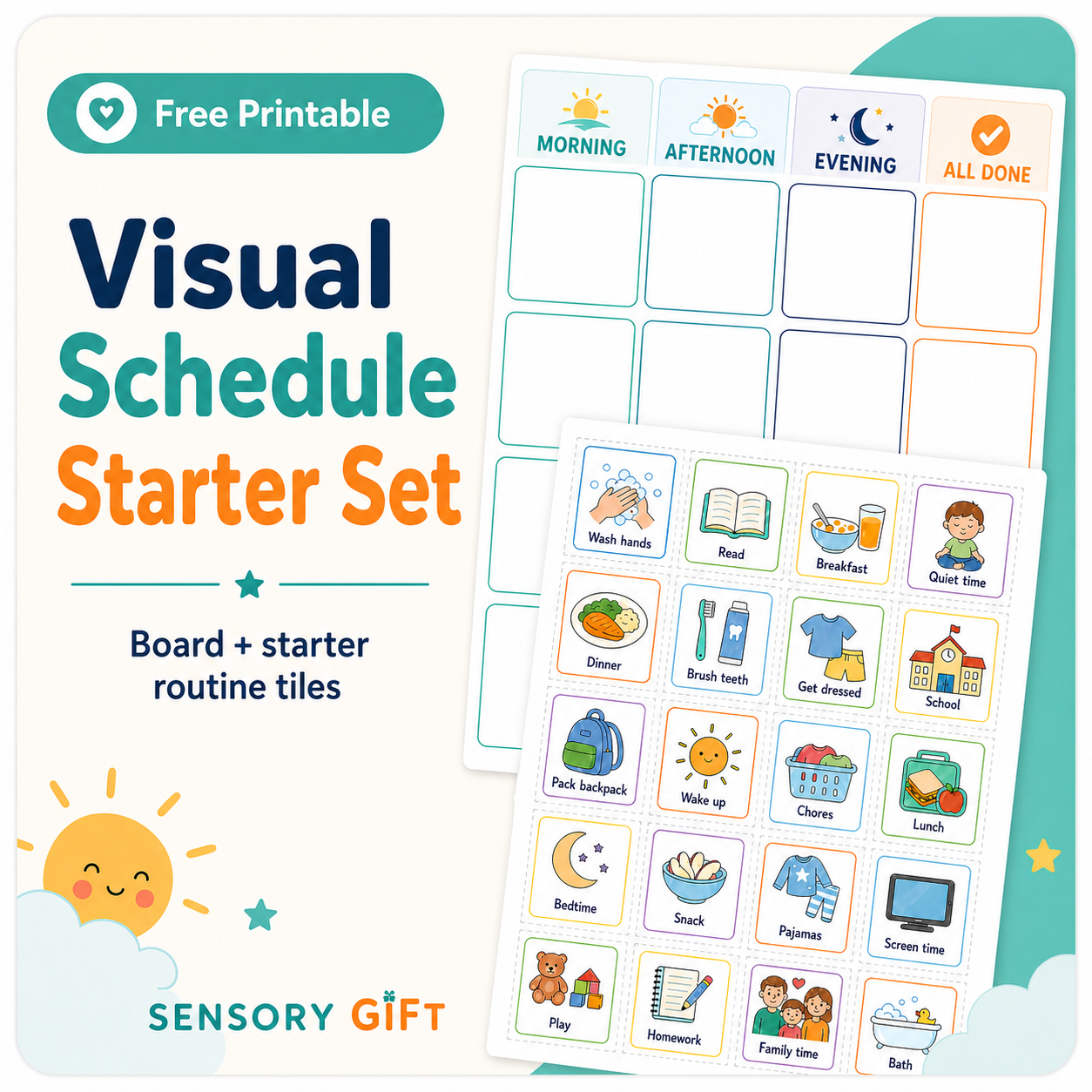
Free movable-tile visual schedule
Use a physical board and starter activity tiles when a tangible, cut-and-move system fits best.
Free Home Day routine in ViziCues
Open a complete daily routine first, then use it on-device, customize it, save it, or print/share it.
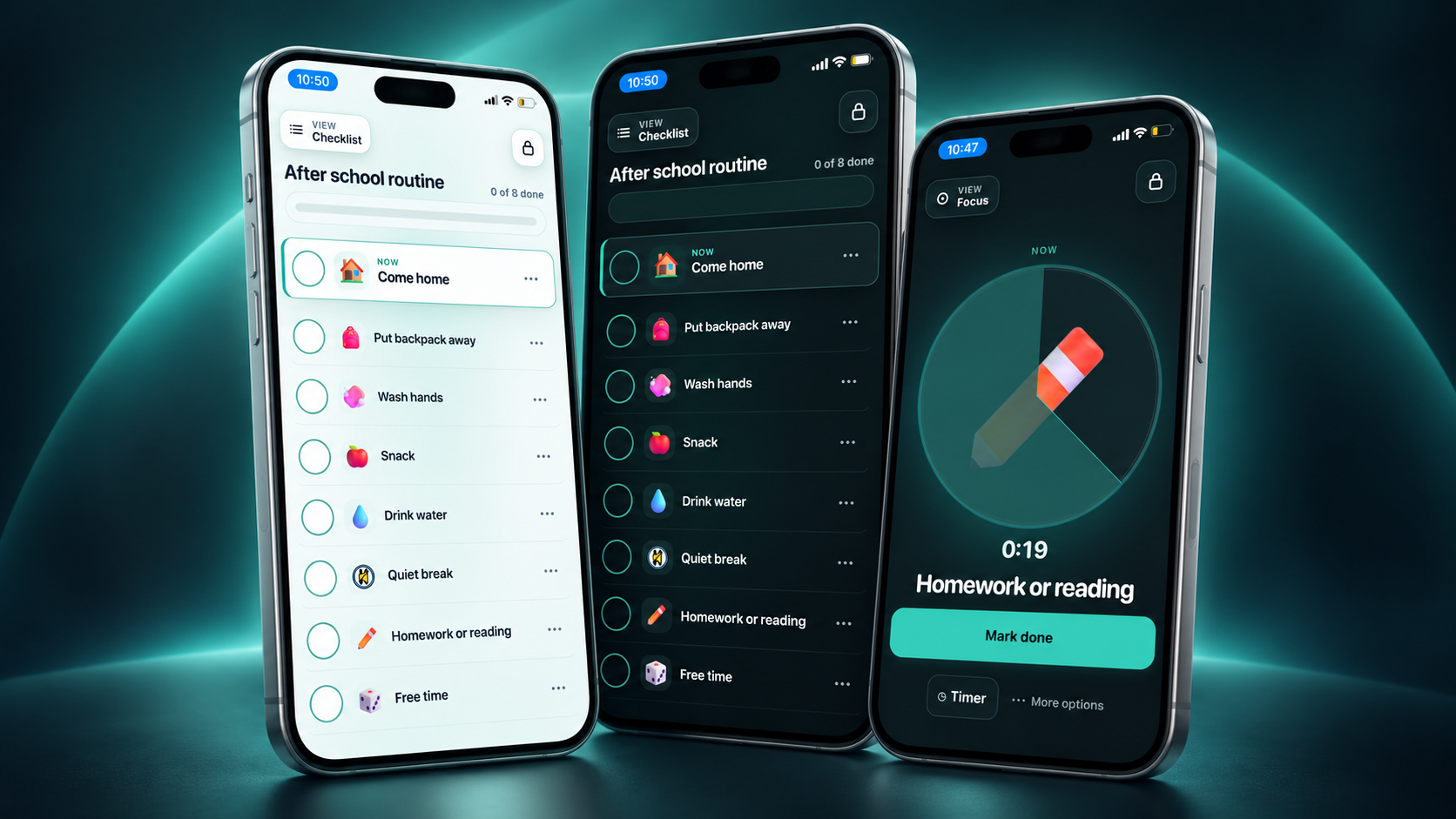
Build your own visual schedule in ViziCues
Use the custom builder when the routine needs different activities, order, wording, visuals, or reusable versions.
If you are still choosing a digital tool rather than ready to build, see the visual schedule apps comparison for a broader look at app options. ViziCues remains the SensoryGift page for building and customizing a schedule directly.
Visual schedule, First-Then board, timer, or another visual support?
| If the hard part is… | Try… | What it makes easier to see |
|---|---|---|
| The order of a routine | Visual schedule | Several steps, a broader sequence, and a visible finish. |
| Only what happens after this | First-Then board | The current step and what follows. |
| How much time is left | Visual timer | Time passing and the approach of an ending. |
| Choosing among a few options | Choice board | Available choices without an open-ended question. |
| A new or unfamiliar event | Visual story | What may happen in an appointment, outing, event, or unfamiliar routine. |
| Stopping, starting, leaving, or switching | Transition supports | What is ending, what comes next, and what may help with the switch. |
Common visual schedule problems — and what to change
Too much is visible
Reduce the number of steps. Show one section, use First-Then, or keep only the current activity visible.
The visuals are not meaningful
Try photos, simpler icons, text, real objects, or another level of detail.
It only appears during conflict
Practice it during ordinary or preferred routines so the schedule does not become a signal that pressure is coming.
It never changes when life changes
Update it. A visual that repeatedly disagrees with reality becomes less trustworthy.
The person has no role in it
When possible, involve the person in choosing the format, checking the plan, moving or marking steps, and deciding how much stays visible.
The schedule itself feels like pressure
Shorten it, simplify the language, remove unnecessary timing, or stop using it in that moment.
Visual schedule FAQ
What is a visual schedule used for?
It makes the order of activities or steps easier to see. It can support routines at home, school, work, appointments, transitions, chores, study blocks, hygiene, and other repeatable sequences.
Are visual schedules only for autism?
No. They are widely used in autism support, but children, teens, and adults with many different needs may benefit from having sequence and next steps outside working memory.
Do visual schedules help autistic children?
They can. The format should match the child’s understanding, communication, sensory needs, and preferences rather than assuming one kind of picture schedule works for everyone.
Can autistic teens and adults use visual schedules?
Yes. A schedule can use words, checklists, discreet icons, a phone-based view, dark presentation, or a printed custom routine. It does not need to look childlike.
How many steps should I put on a visual schedule?
Use the smallest amount that makes the routine understandable. A difficult transition may need only two steps; a contained routine may need a few; a school or workday may use broader blocks.
Should I use photos, pictures, icons, or words?
Use the representation the person recognizes and wants to use. Photos can add specificity, icons can simplify scanning, and words can be ideal for readers who prefer a discreet format.
Does a visual schedule need a finished area?
No. Moving a tile to “finished” is one option. Checking, crossing out, fading, removing, or simply advancing to the next activity can work too.
What is the difference between a visual schedule and a First-Then board?
A visual schedule shows more of a sequence. A First-Then board intentionally keeps only the current step and what follows visible.
Can a visual schedule include a timer?
Yes. They answer different questions: the schedule shows what is happening and what comes next; the timer shows how much time is left. Use time information when it helps rather than adds pressure.
Should I use a full-day visual schedule?
Only if seeing the full day is useful. Many people do better with one routine or a few broad blocks. More visible information is not automatically more supportive.
What if the plan changes?
Change the schedule too. Move, remove, replace, or mark the changed activity so the visual reflects the plan that is actually happening.
What if the person ignores or refuses the visual schedule?
Look at the support before increasing prompting. It may show too much, use unclear visuals, appear only during difficult moments, or not answer the question the person actually needs answered.
Is a printable visual schedule better than an app?
Not automatically. A physical movable board may be best for one person or routine. A digital builder can be easier to edit, reuse, switch views, print, save, or share. Many people use both.
Where can I get a free visual schedule?
You can use SensoryGift’s free movable-tile printable, or open the free Home Day routine in ViziCues for an editable ready-to-use digital schedule.
Visual schedule guidance and research
SensoryGift uses a practical, low-pressure approach. For additional background, review established visual-support guidance from TEACCH, autism resource organizations, and peer-reviewed research on visual schedules and transitions.
SensoryGift visual schedules and apps are everyday educational/support tools. They do not diagnose autism or ADHD and do not replace individualized medical, mental-health, occupational-therapy, educational, or other qualified professional guidance.
You do not need to organize the whole day.
Choose one routine that would be easier if the sequence stayed visible. Start from the ready-made Home Day schedule, use a printable board, build a custom ViziCues routine, or show only two steps. The useful schedule is the one the person can understand and actually use.