
Make the information easier to see
Visual Supports for Routines, Transitions, Time, Choices, and Daily Life
Visual supports turn information that may be hard to hold in mind — steps, time, choices, changes, and what happens next — into something a person can look at. Start with the job the visual needs to do, then choose the smallest support that makes the moment clearer.
Start here
What are visual supports?
A visual support makes information visible instead of asking someone to rely only on spoken instructions, memory, or an internal sense of time.
Visual supports can use objects, photos, icons, written words, cards, boards, schedules, timers, stories, or checklists. They can be useful at home, school, work, appointments, therapy, and community settings — anywhere it helps to see the plan, the options, the time, or the next step.
Understand visual schedules
Learn what a visual schedule is, who may use one, how much to show, different visual formats, common mistakes, and how a schedule differs from First-Then.
Read the Visual Schedule Guide →Use a printable schedule with movable tiles
Download a free ready-made routine board with starter activity tiles when you want a physical support you can print, cut, move, and keep visible.
Get the free Visual Schedule Template →Create your own schedule in ViziCues
Build the exact routine, edit and reuse it, choose how much information stays visible, then use it on-screen or print, save as PDF/image, or share the finished support.
See the ViziCues visual schedule builder →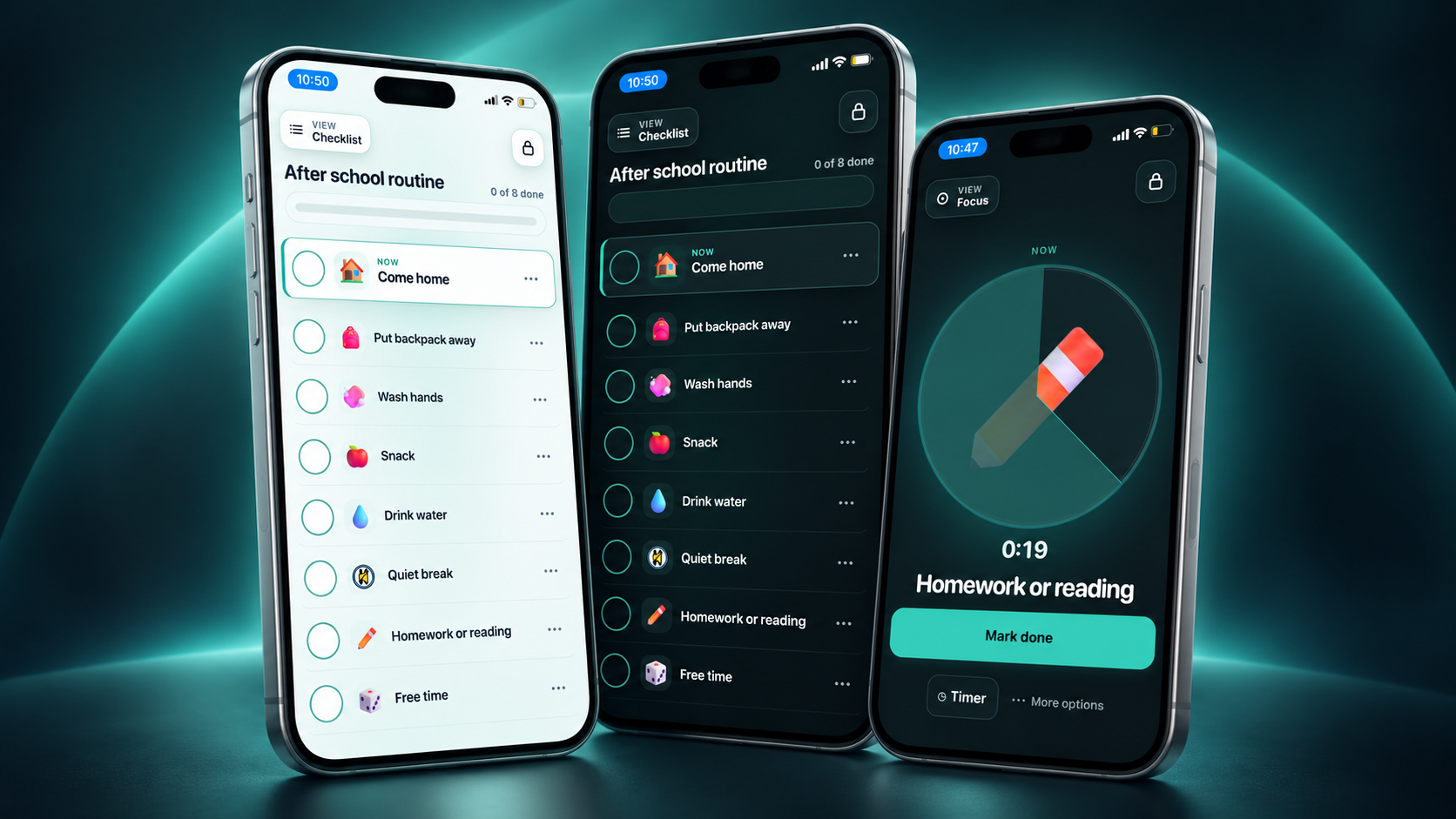
Visual schedules
When the order of several steps needs to stay visible
A visual schedule can show a morning routine, school or work block, hygiene sequence, leaving-the-house plan, bedtime routine, appointment, or another sequence with more than two steps.
Use the guide for examples, autism/ADHD considerations, age-respectful use, setup, and troubleshooting.
Use the free template when movable printed tiles fit the routine.
Use ViziCues when the activities, order, visual presentation, or finished output need to be customized.
Choose by the job
What needs to be easier to see?
You do not need every kind of visual support. Pick the missing information first, then use the smallest tool that answers it.
Only the current step and what follows
Use a First-Then board. It keeps two pieces of information visible when a longer schedule would be more than the moment needs.
A longer routine or sequence
Use a visual schedule. It can keep several steps visible and make the order of a routine easier to revisit without repeated verbal reminders.
How long or how much time is left
Use a visual timer. It can make waiting, work time, breaks, cleanup, screen endings, or departure time easier to understand when time feels abstract.
A few clear, real options
Use a choice board. It makes available options visible when an open-ended question or too many possibilities creates extra work.
Stopping, starting, leaving, or switching
Use transition supports. Make what is ending and what comes next clearer, and add time or sensory support only when those pieces are actually useful.
What may happen in a new situation
Use a visual story. Preview an appointment, outing, school change, unfamiliar routine, or sensory-heavy place before the person has to navigate it in real time.
Low-pressure visual support
Use visuals to reduce guessing, not to create another demand.
Visual supports are most useful when they make information easier to access. They are not promises that the day will go exactly as pictured, behavior charts, or a reason to keep pushing through a plan that no longer fits.
Tools + printables
Use a ready-made support or build the exact one you need
The useful distinction is not paper versus screen. A ready-made printable can be ideal when the setup already fits. A custom builder is better when the routine itself needs to change — and a custom ViziCues schedule can still be printed or exported.
Ready-made tangible support
Free Visual Schedule Template with movable tiles
Print a ready-made routine board and starter activity tiles when you want something physical that can stay visible and be moved by hand.
- Free PDF with no email required.
- Routine board + starter activity pictures.
- Use paper, cardstock, Velcro, magnets, or lamination if useful.
Custom visual support builder
ViziCues: build it once, use it in the format that fits
Use ViziCues when you need the exact activities, order, visual presentation, or amount of information for a routine or transition.
- Build and reuse custom visual schedules.
- Use Checklist, Focus, First-Then, and visual time support.
- Use Friendly or Discreet presentation.
- Print, save as PDF/image, or share the finished support instead of keeping it trapped on-screen.
Quick two-step tool
First-Then Board Generator
Create a simple current-step + what-follows visual when a whole schedule is more information than the moment needs.
More printable supports
Printables for routines, regulation, and appointments
Browse free and expanded printable supports when the visual needs to live on a wall, desk, binder, clipboard, fridge, or in a carry-along set.
When the visual is not the whole problem
Sometimes the steps are already clear.
Visual support library
Find the guide, tool, or printable that fits
Use the deep guide when you want to understand a support. Use the tool or printable when you already know what you need and want to make or use it.
Core guides
- Visual Schedule GuideWhat visual schedules are, examples, autism/ADHD considerations, how to start, and common mistakes.
- First-Then Board GuideTwo visible steps for routines and transitions when less information is better.
- Visual Timer GuideMake time easier to see without turning the timer into pressure.
- Choice Board GuideMake a small number of real options easier to see and communicate.
- Transition Supports GuideSupport stopping, starting, leaving, switching, waiting, and returning.
- Visual Stories GuidePreview new, unfamiliar, hard, or sensory-heavy situations.
Make or use a visual
- Free Visual Schedule TemplateReady-made printable board with movable starter activity tiles.
- ViziCues Visual Schedule BuilderBuild a custom schedule, then use it on-screen or print, save, export, and share it.
- First-Then Board GeneratorCreate a quick custom two-step visual support online.
- Free Printables HubBrowse printable routines, calming supports, communication tools, and other everyday resources.
- Expanded Visual Schedule Printable SetA larger ready-made printable system with more routine and activity options.
- Print + Laminate Setup GuideMake physical boards and tiles sturdier and easier to reuse.
Specific situations
- Visual Routines for ToddlersShort visual routines for common parts of early childhood days.
- Free Dentist Visit Visual SchedulePreview common dentist-visit steps with a simple appointment visual.
- Dentist Visit Visual Support KitA fuller appointment support with story, schedule, choices, and communication pieces.
- Free Calming CardsVisible calming-strategy choices for people who benefit from concrete options.
- Free Regulation CardsFeelings, body cues, and simple support-request visuals.
- Calming + Regulation Card PackA larger reusable printable collection.
Common questions
Visual supports FAQ
The goal is not a perfect visual system. It is enough usable information for the person to understand what matters in the moment.
What are visual supports?
Visual supports make information easier to see instead of relying only on spoken directions, memory, or an internal sense of time. They can include objects, photos, icons, words, visual schedules, First-Then boards, choice boards, visual stories, timers, cards, and checklists.
What visual support should I start with?
Start with the smallest support that answers the missing question. Use First-Then for the current step and what follows, a visual schedule for a longer sequence, a timer for visible time, a choice board for a few real options, a visual story for preparation, or transition supports when stopping or switching is the hard part.
What is the difference between a visual schedule and a First-Then board?
A visual schedule can show several steps in a routine. A First-Then board keeps only two pieces of information visible: the current step and what follows. First-Then is often the better fit when a longer schedule would add too much information.
Are visual supports only for autistic children?
No. Children, teens, and adults can use visual supports whenever seeing the plan, time, choices, or next step is more useful than relying only on spoken information. They are commonly used in autism support, but a diagnosis is not required for a visual support to be useful.
Can adults and teens use visual supports without them looking childish?
Yes. Use age-respectful photos, neutral icons, written words, simple checklists, discreet visual styles, or a custom builder such as ViziCues when the presentation needs to fit an older user or public setting.
Should I use a printable visual schedule or ViziCues?
Use the free visual schedule template when you want a ready-made physical board and the starter activities fit. Use ViziCues when the routine needs to be customized, edited, reordered, or reused. ViziCues can also print and export finished schedules, so the distinction is ready-made versus custom rather than paper versus screen.
Can ViziCues create a printable visual schedule?
Yes. ViziCues is a custom visual schedule builder with interactive on-screen views, but its finished schedules can also be printed, saved as PDF or image, and shared through supported device or browser tools.
When should I use a visual timer instead of a schedule?
Use a timer when the missing information is mainly “How long?” or “How much time is left?” Use a visual schedule when the missing information is the order of several steps. Sometimes both are useful together.
What is the difference between a choice board and a First-Then board?
A choice board shows options the person can actually choose from. A First-Then board shows a sequence. Use a choice board when the problem is seeing or communicating available choices; use First-Then when the problem is understanding what happens next.
What if a visual support makes the moment harder?
Make the support smaller, change the format, or stop using it in that moment. Fewer steps, less language, a different representation, more sensory support, or a lower-demand next step may fit better. A visual support should reduce uncertainty rather than become another source of pressure.
Do visual supports have to use pictures?
No. A useful visual support can use real objects, photos, icons, written words, checklists, timers, or combinations of those formats. Choose the representation the person understands and is comfortable using.
What if the person already knows the routine but still cannot do it?
More visual detail may not be the answer. The missing piece may be sensory support, task initiation, a smaller next step, recovery time, or another barrier. SensyCues may fit a sensory-planning need, while Reset is designed for a hard or stuck moment when the current plan is too much.
Make the missing information visible
Start with one routine, one transition, or one unanswered question.
Choose the smallest useful support first. You can always add more information later if more information actually helps.