
Make a visual schedule that can change with real life.
ViziCues is a free visual schedule maker for building routines, showing what happens next, and keeping the current step visible. Start from a free editable routine, use Smart Builder for a first draft, or create your own schedule from scratch — no account required.
Build a morning routine, home-day plan, school schedule, work block, hygiene sequence, bedtime routine, or one difficult transition. Edit the steps when the real plan changes instead of forcing the day to match an old schedule.
Start with something useful
Open a free visual schedule and make it yours.
These starter routines open directly in ViziCues as editable schedules. Review the routine, change the order, add or remove steps, and use it without creating an account or unlocking Apps Pro.
Home Day
A simple whole-day starting point with everyday anchors such as getting ready, meals, activities, breaks, evening, and bedtime.
See the daily visual schedule guideMorning Routine
A practical getting-ready sequence you can shorten, reorder, or adapt for home, school, work, or a slower start.
See the morning visual schedule guidePreschool Day
A flexible preschool-day starter with arrival, group time, play, meals, outside time, rest, cleanup, and going home.
See the preschool visual schedule guideClassroom Day
A general school-day structure for arrival, work, lessons, breaks, lunch, recess, afternoon work, pack-up, and dismissal.
See the classroom visual schedule guideA template is only a starting point. The useful schedule is the one that matches the actual person, place, and day. You can change the steps before using any of these routines.
Three ways to begin
Create a visual schedule without starting from a blank screen.
Use a ready-made routine when it is close, ask Smart Builder for an editable draft when you know the situation but not the steps, or build the routine yourself when you already know exactly what belongs in it.
Start from a free routine.
Open a useful starter such as Home Day, Morning Routine, Preschool Day, or Classroom Day. Change anything that does not fit before you use it.
Use Smart Builder.
Describe the routine or situation and let Smart Builder create an editable first draft. Review the steps, reorder them, remove what does not fit, and add what is missing.
Build your own.
Add activities, use favorites and reusable activities, create custom activities, reorder the sequence, and save routines that are worth using again.
There is no weekly Smart Builder limit and no Apps Pro requirement to generate or edit a Smart Builder draft. Apps Pro adds other capacity and personalization features described below.
One routine · different amounts of information
Build once. Show only what helps right now.
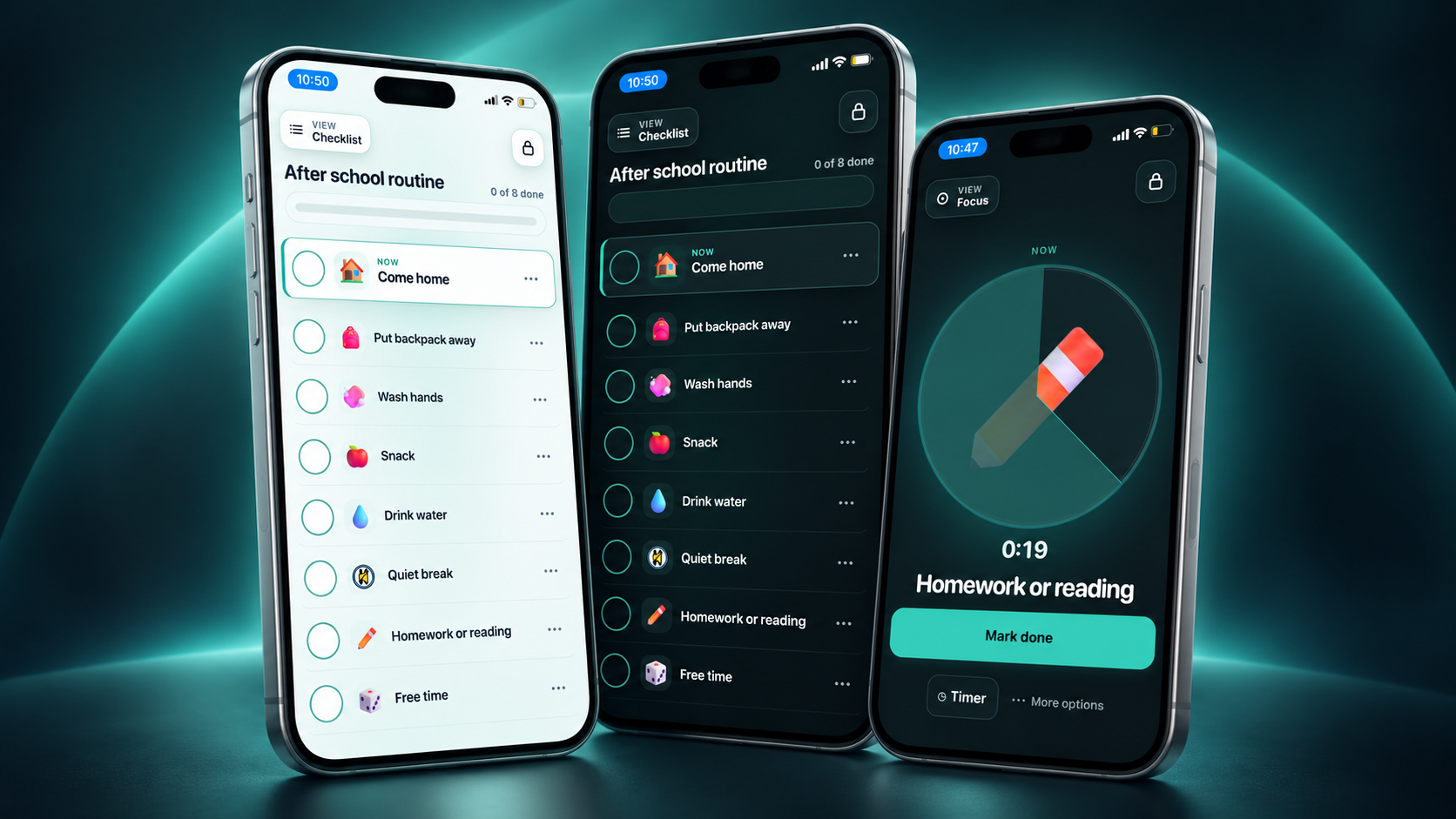
The same routine can stay available as a fuller Checklist, narrow to the current activity in Focus, or become a simple First-Then view when what happens next is the most important information.
See the routine.
Keep the active sequence visible and mark steps complete when seeing the order is part of what makes the plan useful.
See the current activity.
Center one step without carrying the whole list on screen. Visual time support can stay close when time information is useful.
See what happens next.
Keep the current step and what follows visible together when that next piece of predictability matters more than the full routine.
Reduce the surrounding interface.
Let the support take more of the screen when extra controls and interface chrome are not useful in the moment.
More information is not automatically more supportive. Keep the whole sequence when it helps. Show less when the full schedule becomes another thing to process.
Current activity + what comes next
Make time and transitions visible without rebuilding the routine.
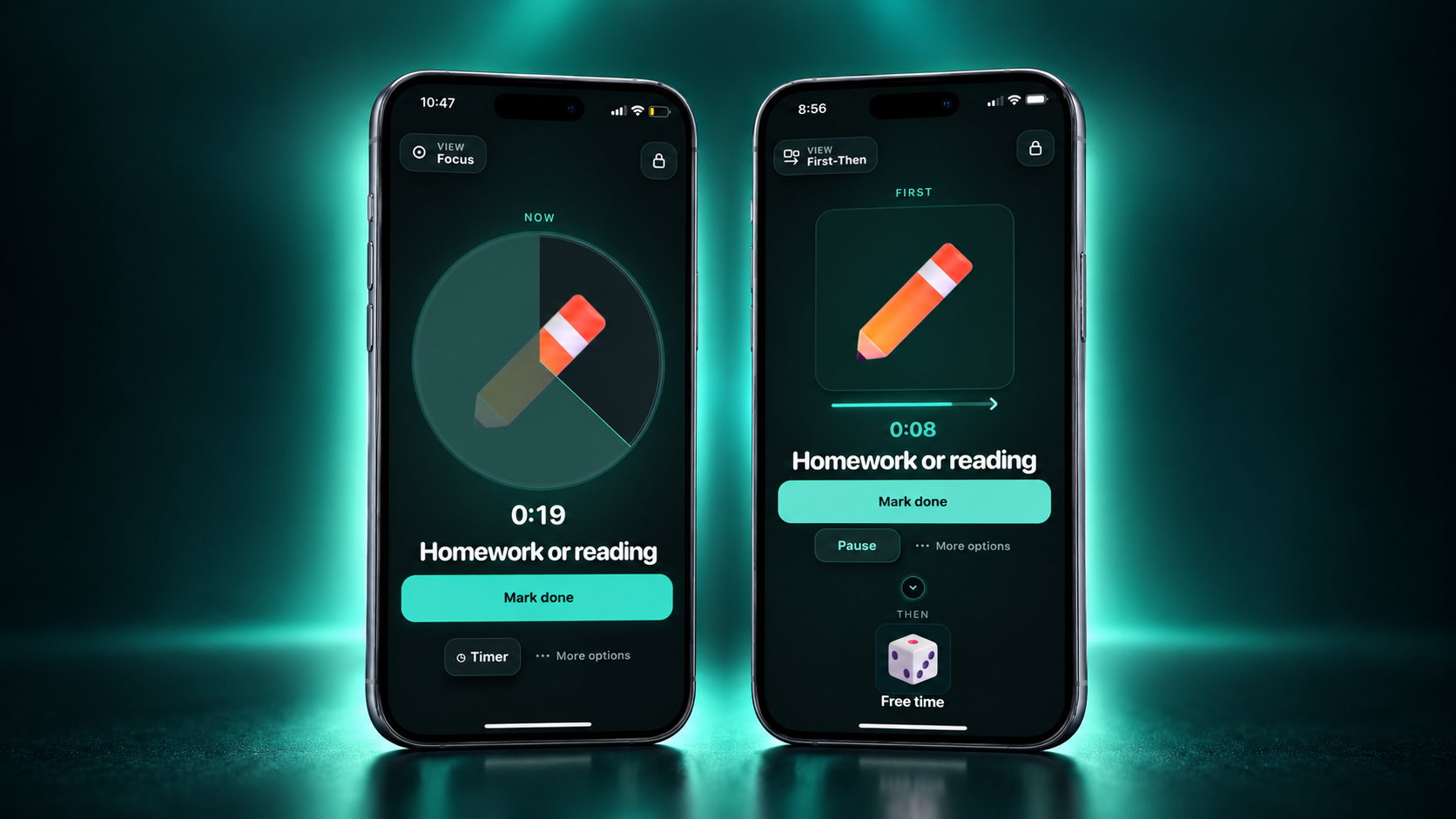
Visual time and First-Then answer different questions. Focus can keep the current activity and time information visible. First-Then can keep the current step and what follows visible together.
Use visual time support when seeing time pass is useful for the activity in front of you.
Use First-Then when the next step itself needs to stay visible during a transition.
Need the concept rather than the app? Read the First-Then board guide, visual timer guide, or transition supports guide.
Make the support fit the person
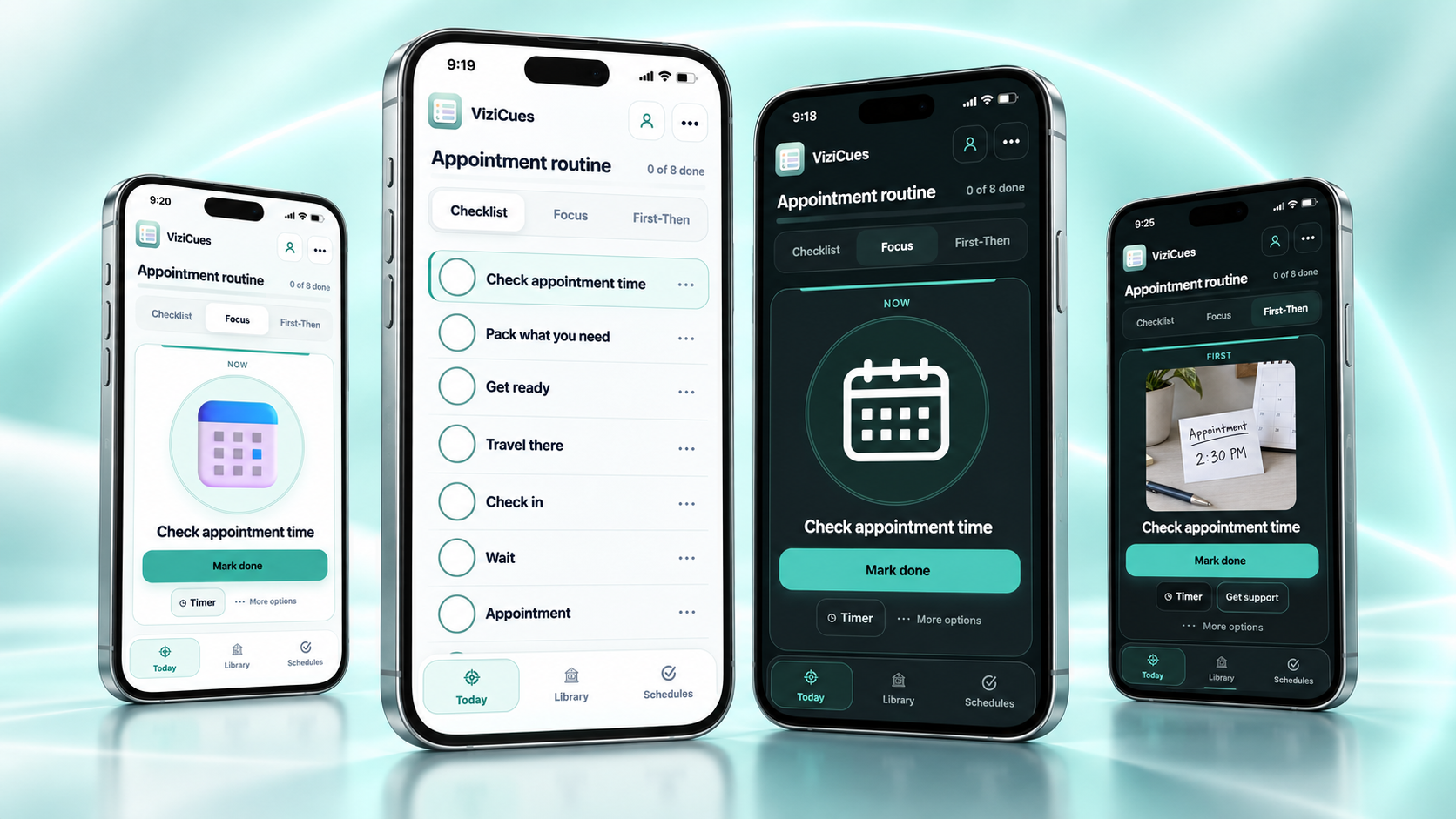
Use Friendly visuals, Discreet icons, words, or your own photos.
A visual schedule does not have to look like a children’s picture chart. Choose the representation that communicates the activity clearly and feels appropriate for the person and setting. Light or dark presentation is a separate choice.
Custom activity photos are available with Apps Pro. Free users can still create reusable custom activities and choose built-in visual or text-forward presentation.
Illustrated cues
Use richer artwork when a more visual cue fits the activity or person.
Simpler icons
Use cleaner, less picture-forward visuals when a quieter presentation fits better.
Real-life cues
Add your own activity photo when a familiar object, place, or real-world image communicates more clearly.
No icon required
Remove the activity icon when the words are enough. Visual support does not have to mean picture-heavy.
Editable by design
The schedule can change when the plan changes.
ViziCues is built around an editable routine rather than a fixed chart. Reorder steps, add something new, remove something that is no longer happening, or reuse the parts of a routine that still fit.
Add what is missing
Use built-in activities, favorites, reusable custom activities, or a new activity created for this routine.
Reorder the plan
Change the sequence when the real order changes instead of rebuilding from the beginning.
Change the details
Edit labels, notes, timing, and presentation where those details help the schedule match real life.
Reuse what earns a place
Save recurring routines and activities so useful plans do not have to start from a blank screen every time.
Digital when useful · portable when needed
Use the schedule on screen, or take it off-screen.
Build and edit digitally, then keep the final support in the format that fits the next part of the day.
Turn the routine into a physical support when paper is the more useful format.
Save as PDF
Keep a document version for printing, storing, or sending where supported.
Save an image
Create a visual file that can stay on a device or move into another everyday context.
Share
Use supported browser or device sharing when the routine needs to move to another person or place.
Looking specifically for a ready-made paper resource? Use the free printable visual schedule template. ViziCues is the custom digital builder.
Built for real routines, not one age group
Make visual schedules for home, school, work, and shared support.
ViziCues can be more visual, more text-forward, more focused, or more discreet depending on the person, setting, and routine. The app does not require one diagnosis, age, or visual style.
Daily routines that can flex
Build getting-ready, hygiene, meal, leaving-home, after-school, chore, appointment, evening, or bedtime routines and edit them when the day changes.
Whole-day or smaller sequences
Create a classroom day, arrival routine, work block, transition, First-Then support, or individual sequence without assuming every student needs the same amount of information.
Age-respectful external structure
Use Discreet icons, text-forward presentation, dark mode, Focus, or a custom routine for work, school, errands, self-care, meal prep, cleaning, appointments, or other everyday sequences.
Need autism-specific guidance on choosing photos, icons, words, schedule length, transitions, and flexibility? Use the autism visual schedule guide. ViziCues itself does not use a generic “autism schedule” template because autism is not a routine.
Free by design · Apps Pro optional
The visual schedule maker and Smart Builder stay free.
ViziCues Free is not a temporary trial. It includes the core schedule builder, the main working views, Smart Builder, free starter routines, and basic export tools. Apps Pro is for people who need more saved capacity, more profiles, photo personalization, premium templates, and expanded output or continuity features.
Build, edit, and use real visual schedules
- 1 profile
- Up to 3 saved routines or templates
- Up to 5 reusable custom activities
- Smart Builder — fully free
- Home Day, Morning Routine, Preschool Day, and Classroom Day starter routines
- Checklist, Focus, and First-Then
- Quiet View and basic visual time support
- Friendly, Discreet, and text-forward presentation
- Basic print, PDF, image, and sharing
- Favorites and reusable activities
- Manual backup and import
- Core appearance and accessibility controls
Add capacity, personalization, and suite-wide Pro features
$6.99/month or $59/year
- Multiple separate profiles
- Unlimited saved routines and templates
- Unlimited reusable custom activities
- Premium template library
- Custom activity photos
- More export customization
- Backup reminders and convenient local restore points
- Deeper reviewed SensyCues and Reset handoffs
- One purchase unlocks current Pro features in ViziCues, SensyCues, and Reset
- Use Apps Pro on up to five active devices
Smart Builder is not a Pro gate. Free users can use Smart Builder without a weekly build limit. Apps Pro upgrades the other capacities and features listed here.
Your saved work is not deleted if Pro ends. ViziCues returns to Free limits, and some items above those limits may become view-only until Apps Pro is active again or the saved content is reduced to Free limits.
This page explains ViziCues. For a comparison-style decision, use the separate visual schedule apps guide.
Local-first privacy + offline-capable core
Your routine content stays on your device by default.
ViziCues does not require a cloud account for the core Free experience. Routine data is designed to stay in the browser or installed app you use unless you deliberately export, back up, import, print, share, or use a reviewed handoff.
No account required
Build and use the core Free schedule workflow without creating a ViziCues cloud account.
Local-first data
Core schedules and settings live in the device or browser where you use the app.
Offline-capable core
After a successful load, the installable app shell can support core local workflows offline.
Manual backup included
Free includes manual backup and import so you can deliberately protect or move saved ViziCues data.
Local-first means backups matter. Before clearing browser/app data or moving devices, make a current backup if you want to keep the saved work on that device.
Three apps · three different jobs
Plan the steps. Support the body. Make hard moments smaller.
ViziCues is the visual-planning part of the SensoryGift app suite. The other apps take over when the problem in front of you changes.
ViziCues
When the steps, order, or what happens next need to be visible. Build the routine, then use Checklist, Focus, First-Then, or Quiet View depending on how much information helps.
SensyCues
When you need an everyday sensory support. Choose supports for real moments, try them, and notice cautious patterns over time.
Learn about SensyCuesReset
When the current plan is too hard. Use one smaller support such as a Tiny Step, script, timer, body check, recovery action, pause, or safe stop.
Learn about ResetStart with one real routine
Make the next part easier to see.
You do not need to organize the whole day. Start with one routine, one transition, or one sequence that would benefit from a clearer next step.
ViziCues questions
About the free visual schedule maker
These answers stay focused on using ViziCues. For broader visual-schedule education, use the visual schedule guide.
Is ViziCues really free?
Yes. ViziCues Free is permanent, not a trial. It includes the core visual schedule builder, Smart Builder, free starter routines, Checklist, Focus, First-Then, Quiet View, basic visual time support, basic print/PDF/image/share tools, and manual backup/import. Apps Pro is optional.
Is Smart Builder free?
Yes. Smart Builder is fully free. There is no weekly Smart Builder limit and no Apps Pro requirement to create or edit a Smart Builder draft.
What does Smart Builder do?
Smart Builder creates an editable first draft of a routine from the situation you describe. The result is a starting point, not a rule: review the steps, reorder them, delete what does not fit, and add anything important before using the schedule.
Do I need an account to make a visual schedule?
No account is required for the core ViziCues Free experience. Apps Pro purchase and restore use separate access verification; that does not turn your routine data into a cloud account.
Can I start from a template instead of building from scratch?
Yes. ViziCues includes free starter routines, including Home Day, Morning Routine, Preschool Day, and Classroom Day. Each can be reviewed and edited before you use it.
Can I use my own activity photos?
Yes with Apps Pro. Custom activity photos can be useful when a familiar real-life cue communicates an activity more clearly than a built-in visual. Photos are optional; Free users can still create reusable custom activities and use built-in Friendly, Discreet, or text-forward presentation.
Can I print or save the schedule?
Yes. ViziCues Free includes basic printing, PDF, image, and supported sharing tools. Apps Pro adds more control over finished exports.
Can ViziCues work offline?
Core local workflows can work offline after the app and its core files have loaded successfully. Website links, updates, purchases, and Apps Pro access checks still require internet access. For troubleshooting, use ViziCues Support.
Where should I go if I am still deciding which visual schedule app to use?
Use the visual schedule apps comparison. That page is for comparing options; this page is the product page for building and using schedules in ViziCues.
Is ViziCues medical or therapy advice?
No. ViziCues is an everyday visual-support and planning tool. It does not diagnose, treat, or replace medical, mental-health, occupational-therapy, educational, or other qualified professional guidance.
Related visual schedule resources